
Runner Services
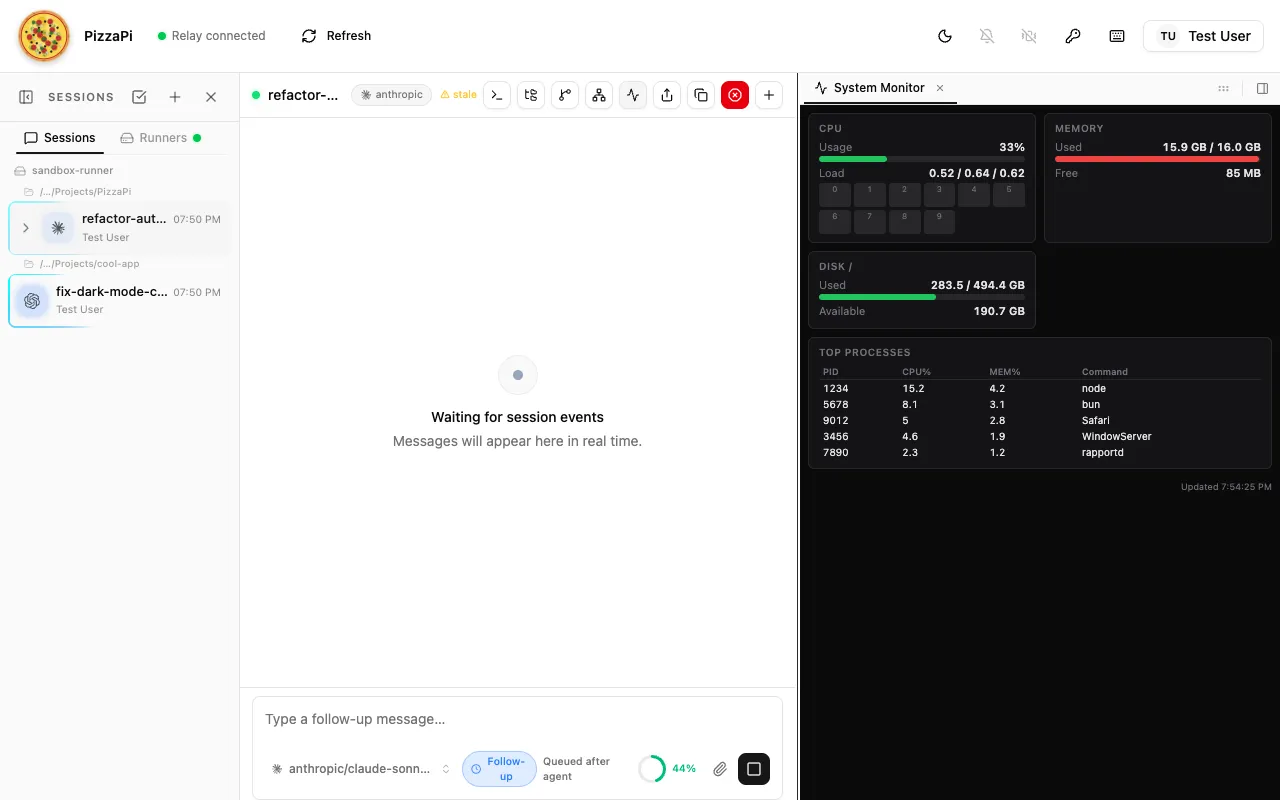
Runner services are background processes on the runner daemon. They can expose interactive UI panels in the PizzaPi web interface and advertise custom triggers that agent sessions can subscribe to.
A service ships inside an overlay package that declares it under pi.pizzapi.services. That is the only way to load one — a service runs on the daemon, outside any session sandbox, so it needs an explicit trust grant that a package install can carry and a loose file cannot.
The two pages divide cleanly: the overlay page is about packaging and trust (manifest layout, install scope, grants, the SDK); this page is about what a service does once loaded (handler lifecycle, panels, triggers, sigils, connectivity). There is no separate “overlay service” concept — a runner service is simply one capability an overlay package can declare.
Quick Start
Section titled “Quick Start”-
Create the package:
Terminal window mkdir -p ~/my-service/service/panelcd ~/my-service -
Declare the service in
package.json:package.json {"name": "@me/my-service","version": "1.0.0","private": true,"type": "module","pi": {"pizzapi": {"schemaVersion": 1,"services": [{"id": "my-service","label": "My Service","icon": "activity","entry": "./service/index.ts","panel": { "dir": "./service/panel" },"triggers": [{"type": "my-service:something_happened","label": "Something Happened","description": "Emitted when something noteworthy occurs"}]}]}}} -
Add
service/index.tswith a ServiceHandler class (see ServiceHandler API below). -
Add
service/panel/index.htmlwith self-contained HTML/CSS/JS (see Panel Guidelines below). -
Install and grant the service:
Terminal window pizza install ~/my-service --allow-daemon-services -
Restart the runner — the panel button appears in the session toolbar header, and triggers become discoverable by agents.
Folder Structure
Section titled “Folder Structure”Directorymy-service/
- package.json — the
pi.pizzapi.servicesdeclaration Directoryservice/
- index.ts — ServiceHandler module (default export)
- triggers.json — trigger definitions (optional)
- sigils.json — sigil type definitions (optional)
Directorypanel/
- index.html — self-contained UI (HTML/CSS/JS)
- … — additional static assets
- package.json — the
Layout inside the package is up to you — only the paths named in the declaration matter, and they are confined to the package root.
Service declaration
Section titled “Service declaration”Each entry in pi.pizzapi.services describes one service:
{ "id": "my-service", "label": "My Service", "icon": "activity", "entry": "./service/index.ts", "panel": { "dir": "./service/panel" }, "triggers": [ { "type": "my-service:something_happened", "label": "Something Happened", "description": "Emitted when something noteworthy occurs", "schema": { "type": "object", "properties": { "itemId": { "type": "string" }, "timestamp": { "type": "number" } } } } ]}| Field | Required | Default | Description |
|---|---|---|---|
id |
Yes | — | Unique service ID (must match ServiceHandler.id) |
label |
Yes | — | Button label shown in the PizzaPi header bar |
icon |
No | "square" |
Lucide icon name (kebab-case) |
entry |
Yes | — | Service module path, relative to the package root (.ts/.js/.mts/.mjs, confined to the package) |
panel.dir |
No | — | Panel static files directory (omit if no panel) |
panel.requires |
No | [] |
Variables the panel needs: any of PWD, SESSION_ID, HOME, USER, PROJECT_DIR |
triggers |
No | [] |
Inline definitions, or a path to a JSON file (see Custom Triggers) |
sigils |
No | [] |
Inline definitions, or a path to a JSON file (see Custom Sigils) |
Split Configuration Files
Section titled “Split Configuration Files”For services with many triggers or sigils, point triggers and sigils at their own JSON files instead of inlining the arrays in package.json.
{ "id": "my-service", "label": "My Service", "entry": "./service/index.ts", "triggers": "./service/triggers.json", "sigils": "./service/sigils.json"}Directorymy-service/
- package.json — core identity (id, label, icon, entry, panel)
Directoryservice/
- triggers.json — trigger definitions (optional)
- sigils.json — sigil type definitions (optional)
- index.ts — ServiceHandler module
Directorypanel/
- index.html — self-contained UI (HTML/CSS/JS)
triggers.json
Section titled “triggers.json”Can be a bare array or an object with a triggers key:
[ { "type": "my-service:event_happened", "label": "Event Happened", "description": "Fired when an event occurs", "schema": { "type": "object", "properties": { "path": { "type": "string" } } } }]Or wrapped in an object:
{ "triggers": [ { "type": "my-service:event_happened", "label": "Event Happened" } ]}sigils.json
Section titled “sigils.json”Defines sigil types this service teaches the UI to render. Can be a bare array or an object with a sigils key:
[ { "type": "pr", "label": "Pull Request", "description": "A GitHub pull request reference", "resolve": "/api/resolve/pr/{id}", "aliases": ["pull-request", "mr"] }, { "type": "commit", "label": "Commit", "resolve": "/api/resolve/commit/{id}" }]| Field | Required | Description |
|---|---|---|
type |
Yes | Sigil type name (used in [[type:id]] syntax) |
label |
Yes | Human-readable label |
description |
No | What this sigil represents |
resolve |
No | API endpoint path for resolving sigil IDs to display data |
example |
No | Canonical emit form shown to agents, e.g. "[[pr:123]]" |
aliases |
No | Alternative type names that resolve to this sigil |
Migrating to Split Files
Section titled “Migrating to Split Files”-
Copy the
triggersarray out of the service declaration into a newtriggers.jsonfile (as a bare JSON array). -
Replace the
triggersvalue with the path to that file. -
(Optional) Do the same for
sigils. -
Restart the runner — the daemon resolves the paths automatically.
Before — everything inline:
{ "id": "my-service", "label": "My Service", "icon": "activity", "entry": "./service/index.ts", "panel": { "dir": "./service/panel" }, "triggers": [ { "type": "my-service:event_a", "label": "Event A" }, { "type": "my-service:event_b", "label": "Event B" } ]}After — split into focused files:
{ "id": "my-service", "label": "My Service", "icon": "activity", "entry": "./service/index.ts", "panel": { "dir": "./service/panel" }, "triggers": "./service/triggers.json"}[ { "type": "my-service:event_a", "label": "Event A" }, { "type": "my-service:event_b", "label": "Event B" }]Custom Triggers
Section titled “Custom Triggers”Services can advertise custom trigger types that agent sessions subscribe to at runtime. This is the primary mechanism for services to push events into agent conversations.
Declaring Triggers
Section titled “Declaring Triggers”Add a triggers array to the service declaration. Each entry describes a trigger type:
| Field | Required | Description |
|---|---|---|
type |
Yes | Namespaced trigger type, e.g. "my-service:event_name" |
label |
Yes | Human-readable label for the UI and agent tools |
description |
No | When/why this trigger fires |
schema |
No | JSON Schema describing the trigger payload |
params |
No | Array of subscription params the service accepts. Each: name, label, type (string/number/boolean/json), description, required, default, enum, multiselect |
modes |
No | Session mode IDs this trigger is scoped to (see Session Modes). Listeners for a mode-scoped trigger must spawn inside that mode’s workspace |
"triggers": [ { "type": "my-service:file_changed", "label": "File Changed", "description": "A watched file was modified", "schema": { "type": "object", "properties": { "path": { "type": "string" }, "changeType": { "type": "string", "enum": ["created", "modified", "deleted"] } } } }]Trigger types are advertised to all connected viewers and agent sessions via the service_announce event when the runner starts.
Firing Triggers
Section titled “Firing Triggers”Publish an Event through the unified engine (ADR-0002); Routes decide which sessions receive it. A session subscribed to your trigger type has a Route for it — your publish reaches exactly the interested sessions:
POST /api/eventsawait fetch(`${relayUrl}/api/events`, { method: "POST", headers: { "Content-Type": "application/json", "x-api-key": apiKey, }, body: JSON.stringify({ type: "my-service:file_changed", payload: { path: "/src/app.ts", changeType: "modified" }, source: { kind: "service", id: "my-service" }, summary: "File changed: /src/app.ts", }),});| Field | Required | Description |
|---|---|---|
type |
Yes | Must match a type declared in the manifest triggers[] array |
payload |
Yes | Arbitrary JSON object delivered via routes |
source |
No | Publisher identity shown in the events feed |
summary |
No | Human-readable one-liner for the events feed |
fireId |
No | Idempotency key: a retried publish with the same fireId is deduplicated |
responseContract |
No | Declare the event awaits a response (actions/ttlMs/escalate) |
target.sessionId |
No | Direct one-session delivery (implicit single-session route); supports deliverAs + wake |
Delivery urgency is decided by each subscriber’s route (deliverAs on the
route: "steer" interrupts, "followUp" queues), not by the publisher.
Subscription params are forwarded to the source service; they are not matched against event payloads by the relay. Use route filters for server-side payload matching. See Trigger Subscription Filters.
Relay Connection Details
Section titled “Relay Connection Details”Services need three values to fire triggers:
| Value | Source |
|---|---|
runnerId |
Read from ~/.pizzapi/runner.json (written by the daemon on startup) |
apiKey |
PIZZAPI_API_KEY or PIZZAPI_RUNNER_API_KEY environment variable |
relayUrl |
PIZZAPI_RELAY_URL env var, or relayUrl in ~/.pizzapi/config.json |
Agent Interaction
Section titled “Agent Interaction”Once triggers are advertised, agents can interact with them using built-in tools:
| Agent action | Tool |
|---|---|
| Discover available triggers | list_available_triggers() |
| Subscribe to a trigger type | subscribe_trigger("my-service:file_changed") |
| Unsubscribe | unsubscribe_trigger({ subscriptionId }) preferred; unsubscribe_trigger("my-service:file_changed") is legacy bulk behavior |
| Update filters/params | update_trigger_subscription({ subscriptionId, filters, filterMode }) |
Subscribed triggers arrive as injected messages in the agent’s conversation, with the payload and metadata from the broadcast.
Trigger Subscription Filters
Section titled “Trigger Subscription Filters”By default, subscribing to a trigger type delivers every event of that type. Filters let you narrow delivery to only payloads that match specific criteria — evaluated server-side before the trigger reaches the agent.
Filters vs Params
Section titled “Filters vs Params”| Concept | Where evaluated | Purpose |
|---|---|---|
params |
Passed to the service | Subscription parameters forwarded to the service (e.g. which repo to watch) |
filters |
Server-side, on delivery | Evaluated against the trigger payload — only matching events are delivered |
You can use both on the same subscription. Params tell the service what to emit; filters tell the relay what to deliver.
Filter objects
Section titled “Filter objects”Each filter is a {field, value, op} object:
| Field | Required | Description |
|---|---|---|
field |
Yes | Dot-path into the trigger payload (e.g. "status", "meta.priority") |
value |
Yes | Expected value — string, number, boolean, or array (array = OR within this filter) |
op |
No | "eq" (exact match, default) or "contains" (substring match on string fields) |
Filter mode
Section titled “Filter mode”When a subscription has multiple filters, filterMode controls how they combine:
| Mode | Behavior |
|---|---|
"and" (default) |
All filters must match for the trigger to be delivered |
"or" |
Any filter matching is enough |
Example: subscribe to only shipped orders
Section titled “Example: subscribe to only shipped orders”subscribe_trigger("orders:status_changed", { filters: [ { field: "status", value: "shipped", op: "eq" } ], filterMode: "and"})Only orders:status_changed events whose payload contains status === "shipped" will reach the agent.
Updating filters without re-subscribing
Section titled “Updating filters without re-subscribing”Use the update_trigger_subscription tool to change filters or filterMode on an existing subscription without unsubscribing and re-subscribing. When subscribe_trigger returns a subscriptionId, use that ID for later edits so multiple same-type subscriptions stay distinct:
update_trigger_subscription({ subscriptionId: "sub_abc123", filters: [ { field: "status", value: "delivered", op: "eq" } ], filterMode: "or"})Passing only a trigger type remains supported as a legacy bulk operation, but it is not precise when multiple subscriptions of the same trigger type exist.
Auto-spawn routes
Section titled “Auto-spawn routes”Use a unified spawn Route when an event should start a fresh agent session;
regular session Routes deliver into an existing conversation. Create, update, and
delete both kinds through /api/routes (see the API reference).
The runner trigger-listener endpoints remain available only as compatibility
wrappers over Routes. The API reference also documents the runner’s schedule
list and route-specific test delivery.
Trigger History
Section titled “Trigger History”Every trigger delivered to a session is recorded in a per-session history log. This provides an audit trail of what events reached the agent and how they were handled.
Storage details
Section titled “Storage details”- Backed by Redis (list per session)
- Maximum 200 entries per session (oldest trimmed on insert)
- 24-hour TTL — history expires automatically if the session is idle
REST API
Section titled “REST API”Get trigger history:
GET /api/sessions/{sessionId}/triggers?limit=50Returns { triggers: TriggerHistoryEntry[] }, most recent first. The limit query parameter defaults to 50 (max 200).
Clear trigger history:
DELETE /api/sessions/{sessionId}/triggersRemoves all history entries for the session.
TriggerHistoryEntry fields
Section titled “TriggerHistoryEntry fields”| Field | Type | Description |
|---|---|---|
triggerId |
string |
Unique ID for this trigger delivery |
type |
string |
Trigger type (e.g. "my-service:file_changed") |
source |
string |
Who fired the trigger (service name or "external:api") |
summary |
string? |
Human-readable one-liner |
payload |
object |
The full trigger payload |
deliverAs |
"steer" | "followUp" |
Delivery mode used |
ts |
string |
ISO timestamp of delivery |
direction |
"inbound" | "outbound" |
Whether the trigger was received or sent by this session |
response |
object? |
Agent’s response — { action?, text?, ts } |
Viewing in the UI
Section titled “Viewing in the UI”The Triggers panel in the session viewer shows the live trigger history for the active session. Each entry displays the trigger type, summary, timestamp, and delivery status. Entries update in real time as triggers are delivered.
Custom Sigils
Section titled “Custom Sigils”Sigils are [[type:id]] tokens in agent output that render as interactive UI elements — clickable chips, status badges, or rich previews. Services define sigil types so the UI knows how to recognise and render them.
Declaring Sigils
Section titled “Declaring Sigils”Add a sigils array to the service declaration, or point it at a standalone sigils.json file (see Split Configuration Files).
Each entry describes a sigil type using the ServiceSigilDef schema:
| Field | Required | Description |
|---|---|---|
type |
Yes | Sigil type name — the token in [[type:id]] syntax, e.g. "pr" |
label |
Yes | Human-readable label shown in the UI, e.g. "Pull Request" |
description |
No | What this sigil represents |
resolve |
No | API endpoint path to resolve a sigil ID to display data (e.g. PR number → title/status) |
example |
No | Canonical emit form shown to agents by list_available_sigils, e.g. "[[pr:123]]" — agents copy it instead of inventing syntax |
aliases |
No | Alternative type names that resolve to this sigil (e.g. ["pull-request", "mr"]) |
icon |
No | Lucide icon name rendered with the sigil |
Example: GitHub Service Sigils
Section titled “Example: GitHub Service Sigils”A GitHub integration service might define pr and commit sigil types:
{ "id": "github", "label": "GitHub", "icon": "github", "entry": "./index.ts", "sigils": [ { "type": "pr", "label": "Pull Request", "description": "A GitHub pull request — renders as a clickable chip with status", "resolve": "/api/resolve/pr/{id}", "aliases": ["pull-request", "mr"] }, { "type": "commit", "label": "Commit", "description": "A Git commit hash — renders with short SHA and message", "resolve": "/api/resolve/commit/{id}" } ]}With these definitions registered, when an agent writes [[pr:42]] or [[commit:abc1234]] in its output, the UI renders them as interactive elements instead of plain text.
A resolve endpoint may also return text, the canonical plain-text representation for copy, exports, notifications, and other integrations. title remains the display fallback for existing services; unresolved sigils are preserved unchanged.
Sigil types are advertised to all connected viewers via the service_announce event, the same way trigger definitions are.
Services Without Panels
Section titled “Services Without Panels”A service doesn’t need a UI panel. Omit panel from the manifest and skip announcePanel(). The service still runs in the background and can fire triggers:
{ "id": "my-watcher", "label": "File Watcher", "entry": "./index.ts", "triggers": [ { "type": "my-watcher:file_changed", "label": "File Changed" } ]}Session Modes
Section titled “Session Modes”A session mode is a workspace with its own identity in the UI. A mode claims a directory; every session whose working directory is inside it belongs to that mode, including sessions started from the terminal.
Modes exist so a package can make PizzaPi feel like the right tool for non-coding work. A mode declares what it wants and PizzaPi renders it natively — modes do not ship UI code.
{ "id": "pizzawork", "label": "PizzaWork", "entry": "./src/service.ts", "sessionModes": [ { "id": "work", "label": "Work", "icon": "briefcase", "workspace": "~/Documents/Workspace", "ui": { "preset": "work", "toolRendering": "activity", "vocabulary": { "session": "task", "sessions": "tasks" }, "accent": "#7c3aed", "composerPlaceholder": "What do you need done?", "home": { "greeting": "What are we working on?", "suggestions": [ { "label": "Daily report", "icon": "sun", "prompt": "Write my daily report" } ] }, "artifacts": { "enabled": true }, "scheduled": true } } ]}Mode fields
Section titled “Mode fields”| Field | Type | Description |
|---|---|---|
id |
string | Unique mode ID within the package |
label |
string | Name shown on the mode picker |
icon |
string | Lucide icon name |
workspace |
string | Home-relative path (~/...), resolved per runner |
ui |
object | Optional — how PizzaPi should render this mode’s sessions |
ui fields
Section titled “ui fields”Every field is optional, and omitting ui entirely gives the standard coding
UI. A mode only declares what differs.
| Field | Type | Default | Description |
|---|---|---|---|
preset |
"coding" | "work" |
"coding" |
work hides git, terminal and process chrome |
chrome |
object | from preset | Per-surface overrides: git, terminal, processes, diffs, files |
toolRendering |
"detailed" | "activity" |
preset-derived | activity collapses each tool call to a human-language line that expands on click |
vocabulary |
object | — | session, sessions, newSession noun overrides |
accent |
string | — | Color token or hex used for the mode badge |
composerPlaceholder |
string | — | Placeholder text in the composer |
home |
object | — | greeting, suggestions[] (label, icon, prompt), recent |
artifacts |
object | disabled | enabled, plus optional extensions[] |
scheduled |
boolean | false |
Show standing time:cron / time:at instructions |
What each surface does
Section titled “What each surface does”Chrome. preset: "work" hides the git, terminal and process affordances. A
hidden panel is also closed, so switching from a coding session cannot strand a
panel with no button to reopen it. chrome overrides individual flags:
"ui": { "preset": "work", "chrome": { "git": true } }Activity rendering. With toolRendering: "activity", a tool call renders as
one line — Created q3-review.md, Searched the web for "freight rates" — that
expands to the full card. Nothing is hidden; it just stops being the default
way the transcript reads.
Artifacts. When enabled, a file written into the workspace whose extension
the mode claims renders as an artifact card with an inline preview: Markdown,
images, PDF, CSV tables and sandboxed HTML. Formats browsers cannot render
(docx, pptx, xlsx) get a download card. Omit extensions for a
document-centric default set.
Mode home. Selecting a mode with no session open shows a composer that
starts a task directly in the mode’s workspace, its suggestion chips, and its
recent tasks. Suggestions prefill the composer rather than sending, so an
opening like "Research " can be completed before it runs.
Scheduled. Lists standing time:cron / time:at / time:timer_fired
subscriptions across the mode’s sessions, with what runs, when, which task owns
it, and a cancel. See Time triggers.
Connectivity Services
Section titled “Connectivity Services”A connectivity service owns a live connection to an outside network — a chat gateway, a webhook receiver, a message queue, an MQTT broker. This is the shape to reach for whenever sessions need to talk to a third-party system that keeps a persistent connection open.
The rule is simple: the daemon owns one connection, and sessions never open their own.
Why not a per-session abstraction
Section titled “Why not a per-session abstraction”The tempting design is a per-session object — every session gets a bridge it
can connect and send through. It does not survive contact with a real service:
| Problem | What happens with N sessions |
|---|---|
| N connections | Ten sessions means ten gateway connections on one bot token. Discord rate-limits identifies per token; other providers ban outright. |
| Duplicate inbound | Every connection receives every event. Ten sessions each see the same message and ten agents answer it. |
| Lifetime mismatch | Connections belong to the machine, not the conversation. Sessions start and stop constantly; a connection that dies with a session cannot receive anything between sessions — including the message that should start one. |
| Credential spread | The token has to be readable by every session process instead of living in one place on the daemon. |
| No routing authority | “Which session owns this thread?” has no answer if every session holds its own map. |
The daemon is the only component with the right lifetime and the right cardinality. Everything else follows from putting the connection there.
The two directions
Section titled “The two directions”Inbound and outbound use different transports, because they have different routing problems.
Inbound — outside world → session. The service already knows which session the event belongs to (it owns the mapping), so it delivers straight to that one session over HTTP:
// Targeted: this session only. No subscription required.await fetch(`${relayUrl}/api/events`, { method: "POST", headers: { "Content-Type": "application/json", "x-api-key": apiKey }, body: JSON.stringify({ type: "discord:message", payload: { threadId, text }, target: { sessionId, deliverAs: "steer" }, source: { kind: "service", id: "discord" }, }),});Publish without a target when the event has no single owner and any
interested session should hear it — a CI result, a repo-wide push. Every session
with a route for the type receives it; target.sessionId addresses exactly one
conversation.
Outbound — session → outside world. The session emits a service_message
envelope on its own relay socket. The relay forwards it to the daemon, which
routes it to the service by serviceId:
// In a session-side extension.socket.emit("service_message", { serviceId: "discord", type: "discord_post", payload: { sessionId, content },});The service picks it up in the handler it registered during init():
init(socket, opts) { this.onMessage = (envelope) => { if (envelope.serviceId !== "discord") return; if (envelope.type === "discord_post") void this.post(envelope.payload); }; socket.on("service_message", this.onMessage);}Note what the session does not do: it does not look up a thread, hold a token, or know whether the bridge is even configured. It emits one envelope and the service drops it if that session has no mapping. Routing lives in exactly one place.
Mapping sessions to conversations
Section titled “Mapping sessions to conversations”The service owns the mapping and is responsible for its whole lifecycle:
- Persist it. Write bindings to the service’s
settings.json(write-to-temp then rename) so a daemon restart does not orphan every live conversation. - Index both ways. Keep
sessionId → conversationin memory for outbound routing; the persisted map is keyed by conversation for inbound. - Clean up on session end. Implement
handleSessionEnded(sessionId)to drop the binding, and tell the remote side the conversation is over. - Unbind on delivery failure. A
404from a direct-targetPOST /api/eventsmeans the session is gone (or not owned by the caller). Drop the binding rather than silently swallowing every subsequent message.
Driving the session from the far side
Section titled “Driving the session from the far side”A connectivity service usually wants to control the session, not just relay text. Most of that already exists over HTTP with API-key auth:
| Action | Endpoint |
|---|---|
| Spawn a session | POST /api/runners/:runnerId/spawn |
| Send a trigger event to a session | POST /api/events with target.sessionId |
| List sessions | GET /api/sessions |
| List models | GET /api/runners/:runnerId/models |
| Switch a session’s model | POST /api/sessions/:id/model |
| Abort a session’s current turn | POST /api/sessions/:id/abort |
| Set thinking level | POST /api/sessions/:id/thinking |
Anything a viewer drives over a socket event has no HTTP equivalent unless one
is added. POST /api/sessions/:id/model exists precisely because switching a
live model was viewer-only (model_set), and a runner service is not a viewer.
There is still no HTTP route to kill a session — abort only stops the
current turn; kill_session is server→runner only.
Worked example
Section titled “Worked example”The Discord bridge implements exactly this pattern — one gateway connection for
the runner, thread-per-session bindings, session spawning from a mention, native
slash commands, and a panel for status and controls. Its session-side half is
packages/cli/src/extensions/discord-mirror.ts, which forwards each settled
assistant turn and nothing else.
Commands that pick from a list render a select menu rather than asking the
user to type an exact id — /models shows the available models with the current
one preselected, /sessions binds the thread to a running session. Two details
worth copying:
- Defer before any network call. Discord expires an interaction after 3
seconds, so
deferReply()first andeditReply()once the data arrives. - Encode the target in
custom_id. The menu carries the thread it was built for, so a stale menu left open elsewhere cannot retarget a different binding.
ServiceHandler API
Section titled “ServiceHandler API”The service module must default-export a class implementing the ServiceHandler interface:
import { existsSync, readFileSync } from "node:fs";import { join, dirname } from "node:path";import { homedir } from "node:os";import { fileURLToPath } from "node:url";import type { Server } from "bun";
// ── Relay helpers (for firing triggers) ───────────────────────────────────
function readRunnerId(): string | null {    try {        const home = process.env.HOME || homedir();        const raw = JSON.parse(readFileSync(join(home, ".pizzapi", "runner.json"), "utf-8"));        return typeof raw?.runnerId === "string" ? raw.runnerId : null;    } catch { return null; }}
function resolveRelayUrl(): string {    const home = process.env.HOME || homedir();    let raw = process.env.PIZZAPI_RELAY_URL?.trim();    if (!raw) {        try {            const cfg = JSON.parse(readFileSync(join(home, ".pizzapi", "config.json"), "utf-8"));            if (typeof cfg?.relayUrl === "string" && cfg.relayUrl !== "off") raw = cfg.relayUrl.trim();        } catch { /* ignore */ }    }    raw = raw || "http://localhost:7492";    if (raw.startsWith("ws://"))  return raw.replace(/^ws:/, "http:").replace(/\/$/, "");    if (raw.startsWith("wss://")) return raw.replace(/^wss:/, "https:").replace(/\/$/, "");    return raw.replace(/\/$/, "");}
function getApiKey(): string | null {    return process.env.PIZZAPI_RUNNER_API_KEY ?? process.env.PIZZAPI_API_KEY ?? null;}
async function publishTrigger(    type: string,    payload: Record<string, unknown>,    opts?: { summary?: string },): Promise<void> {    const apiKey = getApiKey();    if (!apiKey) return;
    await fetch(`${resolveRelayUrl()}/api/events`, {        method: "POST",        headers: { "Content-Type": "application/json", "x-api-key": apiKey },        body: JSON.stringify({            type,            payload,            ...(opts?.summary ? { summary: opts.summary } : {}),            source: { kind: "service", id: "my-service" },        }),    }).catch(err => console.error("[my-service] trigger publish failed:", err));}
// ── Service ───────────────────────────────────────────────────────────────
class MyService {    get id() { return "my-service"; }
    #server: Server | null = null;
    init(_socket: any, { announcePanel, announceSigilServer }: any) {        const panelDir = join(dirname(fileURLToPath(import.meta.url)), "panel");        const indexHtml = readFileSync(join(panelDir, "index.html"), "utf-8");
        this.#server = Bun.serve({            port: 0,            fetch: async (req) => {                const url = new URL(req.url);
                if (url.pathname.endsWith("/api/data")) {                    return Response.json({ hello: "world" }, {                        headers: { "Access-Control-Allow-Origin": "*" },                    });                }
                if (url.pathname.endsWith("/api/do-thing") && req.method === "POST") {                    // Publish an event; routes decide which sessions receive it                    void publishTrigger("my-service:something_happened", {                        itemId: "abc-123",                        timestamp: Date.now(),                    }, { summary: "A thing happened" });
                    return Response.json({ ok: true }, {                        headers: { "Access-Control-Allow-Origin": "*" },                    });                }
                return new Response(indexHtml, {                    headers: { "Content-Type": "text/html; charset=utf-8" },                });            },        });
        if (announcePanel) {            announcePanel(this.#server.port);        }        if (announceSigilServer) {            announceSigilServer(this.#server.port);        }    }
    dispose() {        if (this.#server) {            this.#server.stop(true);            this.#server = null;        }    }}
export default MyService;
The default export may be a handler instance, a class (the loader calls new), or a factory function returning a handler. Whichever shape you use, its id must equal the declared id.
Lifecycle (ServiceHandler in @pizzapi/extension-sdk):
init(socket, options)— called once when the runner starts; the same socket instance survives reconnects.optionscarriesisShuttingDown(), plusannouncePanel(port)(only if the manifest declares a panel) andannounceSigilServer(port)(for panel-less sigil resolvers).dispose()— called on shutdown. Must clean up the HTTP server to avoid port leaks.handleSessionEnded?(sessionId)— optional; drop per-session state (bindings, watchers) when a session ends.reconcileSubscriptions?(subscriptions, options)— optional; called after runner reconnect with the current subscriptions for your trigger types. Implement it if you keep per-subscription runtime state (timers, watchers) and return{ applied, errors? }.
Panel Guidelines
Section titled “Panel Guidelines”Panels render inside an iframe in the PizzaPi web interface. The bottom dock is 280px tall; the side dock is 320px wide. Key constraints:
- Self-contained — all CSS and JS must be inline (no build step required)
- Dark theme — match PizzaPi’s dark UI:
body { background: #0a0a0b; color: #e4e4e7; font-size: 11px; }/* Borders: #27272a */
- Relative API URLs — use
./api/data(the tunnel proxy preserves the path) - Polling for live data — use
setInterval+fetch(typically 3–5s intervals) - Keep panels self-contained — external resources may fail depending on CSP/network
- CORS headers — API responses need
Access-Control-Allow-Origin: * - Opaque origin unless a tunnel domain is set — panels never run as the PizzaPi origin. Without
PIZZAPI_TUNNEL_DOMAINthey load from a signed relay path inside a sandbox with an opaque origin:localStorage,sessionStorage, anddocument.cookieare in-memory for that page load only,Set-Cookieis dropped, and there is no access to the parent window. Configure a tunnel domain if a panel must persist browser state. - Panel loads are cross-site — the iframe navigation that loads your panel arrives with
Sec-Fetch-Site: cross-site, and on the signed relay path the panel’s own requests carryOrigin: null. Don’t reject reads on origin checks; apply CSRF checks only to state-changing methods (POST/PUT/DELETE), and on the signed path authenticate those some other way thanOrigin.
How It Works
Section titled “How It Works”- The runner daemon reads
pi.pizzapi.servicesfrom every configured package that holds a daemon-service grant - It resolves panel metadata and trigger definitions from the declaration (or the split JSON files it points at)
- It loads the service module and calls
init(socket, { announcePanel }) - The service starts
Bun.serve()on port 0 and callsannouncePanel(port) - The daemon aggregates all trigger defs and sigil defs from all loaded services
- The daemon emits a
service_announceevent with panels, trigger defs, and sigil defs - The UI renders panel iframes; agents discover triggers via
list_available_triggers() - When a service publishes an event via
POST /api/events, the routing engine delivers it to every route matching the type
Quick Reference
Section titled “Quick Reference”| Task | How |
|---|---|
| Declare triggers | Add triggers[] to the service declaration, or point it at triggers.json |
| Declare sigils | Add sigils[] to the service declaration, or point it at sigils.json |
| Fire a trigger | POST /api/events with API key (routes decide recipients) |
| Serve static files | Bun.serve() with readFileSync for index.html |
| Expose an API | Add route checks in the fetch handler |
| Get a random port | Bun.serve({ port: 0 }) then read .port |
| Announce the panel | Call announcePanel(server.port) in init() |
| Announce a sigil server | Call announceSigilServer(server.port) in init() |
| Match PizzaPi theme | #0a0a0b bg, #e4e4e7 text, #27272a borders |
| Choose an icon | Browse lucide.dev/icons, use kebab-case |
Troubleshooting
Section titled “Troubleshooting”| Problem | Fix |
|---|---|
| Triggers declared but not delivered | You must publish them via POST /api/events — declaring them in the manifest only advertises them |
| Missing runnerId or apiKey | Read from ~/.pizzapi/runner.json and env vars at call time, not init time |
| Panel doesn’t appear in UI | Check that announcePanel() is called after the server starts |
| Blank panel iframe | Tunnel proxy can’t reach local server — check the service is still running |
| API calls fail in panel | Add Access-Control-Allow-Origin: * header to API responses |
| Large panel doesn’t fit | Bottom dock is 280px tall; side dock is 320px wide — design accordingly |
| Absolute API URLs break | Use relative URLs (./api/...) — the tunnel proxy rewrites paths |
| Port leak after restart | Ensure dispose() calls server.stop(true) |