
Runner Services
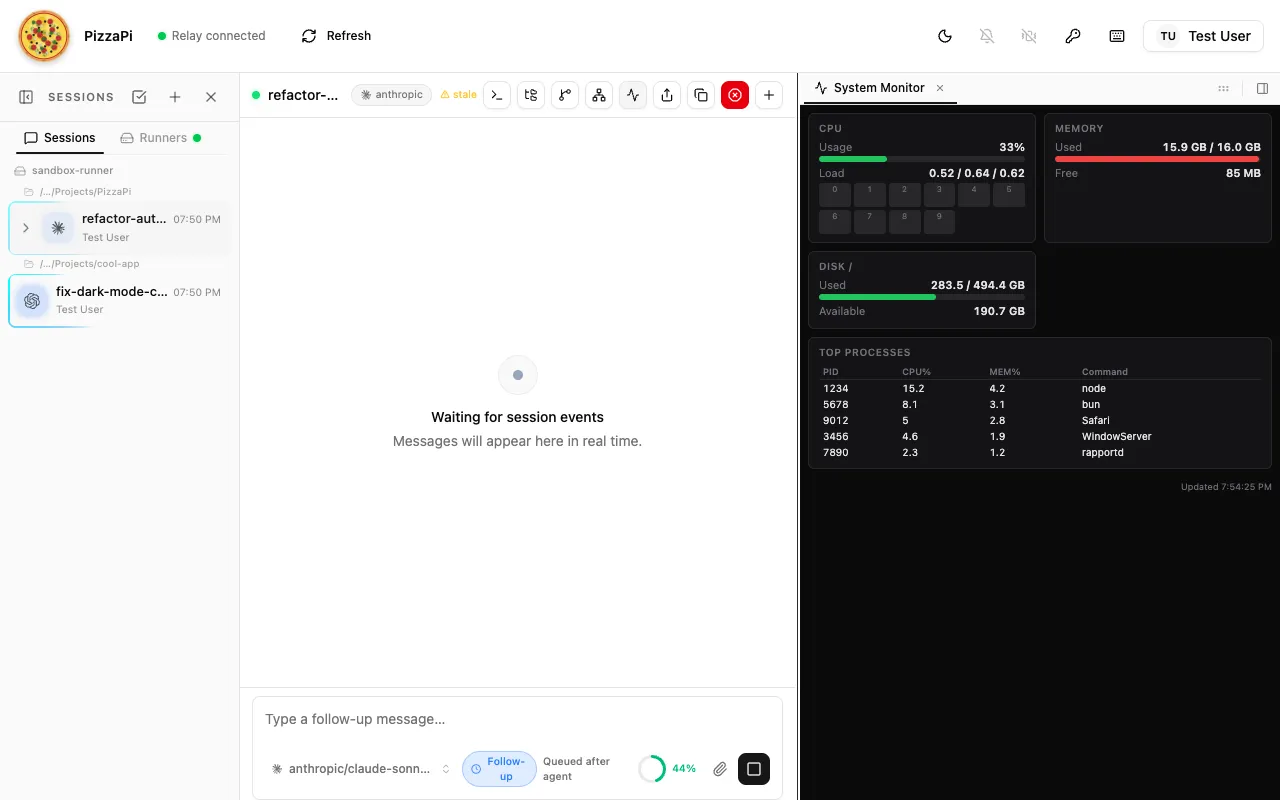
Runner services are background processes on the runner daemon. They can expose interactive UI panels in the PizzaPi web interface and advertise custom triggers that agent sessions can subscribe to. Each service is discovered automatically from ~/.pizzapi/services/ on startup.
Quick Start
Section titled “Quick Start”-
Create the service directory:
Terminal window mkdir -p ~/.pizzapi/services/my-service/panel -
Add
manifest.json:{"id": "my-service","label": "My Service","icon": "activity","entry": "./index.ts","panel": {"dir": "./panel"},"triggers": [{"type": "my-service:something_happened","label": "Something Happened","description": "Emitted when something noteworthy occurs"}]} -
Add
index.tswith a ServiceHandler class (see ServiceHandler API below). -
Add
panel/index.htmlwith self-contained HTML/CSS/JS (see Panel Guidelines below). -
Restart the runner — the panel button appears in the session toolbar header, and triggers become discoverable by agents.
Folder Structure
Section titled “Folder Structure”Directory~/.pizzapi/services/my-service/
- manifest.json — metadata, panel config, and trigger definitions
- index.ts — ServiceHandler module (default export)
Directorypanel/
- index.html — self-contained UI (HTML/CSS/JS)
- … — additional static assets
Services can also be bundled inside Claude Code plugins:
Directory~/.pizzapi/plugins/my-plugin/
- plugin.json
Directoryservices/
Directorymy-service/
- manifest.json
- index.ts
Directorypanel/
- index.html
manifest.json
Section titled “manifest.json”{ "id": "my-service", "label": "My Service", "icon": "activity", "entry": "./index.ts", "panel": { "dir": "./panel" }, "triggers": [ { "type": "my-service:something_happened", "label": "Something Happened", "description": "Emitted when something noteworthy occurs", "schema": { "type": "object", "properties": { "itemId": { "type": "string" }, "timestamp": { "type": "number" } } } } ]}| Field | Required | Default | Description |
|---|---|---|---|
id | Yes | — | Unique service ID (must match ServiceHandler.id) |
label | Yes | — | Button label shown in the PizzaPi header bar |
icon | No | "square" | Lucide icon name (kebab-case) |
entry | No | "./index.ts" | Service module path relative to the service folder |
panel.dir | No | "./panel" | Panel static files directory (omit if no panel) |
triggers | No | [] | Trigger type definitions (see Custom Triggers below, or use triggers.json) |
sigils | No | [] | Sigil type definitions (see Custom Sigils below, or use sigils.json) |
Split Configuration Files
Section titled “Split Configuration Files”For services with many triggers or sigils, you can split configuration into separate files. Split files take precedence over inline arrays in manifest.json.
Directory~/.pizzapi/services/my-service/
- manifest.json — core identity (id, label, icon, entry, panel)
- triggers.json — trigger definitions (optional, overrides manifest triggers)
- sigils.json — sigil type definitions (optional, overrides manifest sigils)
- index.ts — ServiceHandler module
Directorypanel/
- index.html — self-contained UI (HTML/CSS/JS)
triggers.json
Section titled “triggers.json”Can be a bare array or an object with a triggers key:
[ { "type": "my-service:event_happened", "label": "Event Happened", "description": "Fired when an event occurs", "schema": { "type": "object", "properties": { "path": { "type": "string" } } } }]Or wrapped in an object:
{ "triggers": [ { "type": "my-service:event_happened", "label": "Event Happened" } ]}sigils.json
Section titled “sigils.json”Defines sigil types this service teaches the UI to render. Can be a bare array or an object with a sigils key:
[ { "type": "pr", "label": "Pull Request", "description": "A GitHub pull request reference", "resolve": "/api/resolve/pr/{id}", "aliases": ["pull-request", "mr"] }, { "type": "commit", "label": "Commit", "resolve": "/api/resolve/commit/{id}" }]| Field | Required | Description |
|---|---|---|
type | Yes | Sigil type name (used in [[type:id]] syntax) |
label | Yes | Human-readable label |
description | No | What this sigil represents |
resolve | No | API endpoint path for resolving sigil IDs to display data |
schema | No | JSON Schema for sigil params |
aliases | No | Alternative type names that resolve to this sigil |
Migrating to Split Files
Section titled “Migrating to Split Files”To split an existing manifest.json:
-
Copy the
triggersarray frommanifest.jsoninto a newtriggers.jsonfile (as a bare JSON array). -
Remove the
triggerskey frommanifest.json. -
(Optional) Create
sigils.jsonwith any sigil definitions. -
Restart the runner — the daemon will load split files automatically.
Before — everything in one file:
{ "id": "my-service", "label": "My Service", "icon": "activity", "entry": "./index.ts", "panel": { "dir": "./panel" }, "triggers": [ { "type": "my-service:event_a", "label": "Event A" }, { "type": "my-service:event_b", "label": "Event B" } ]}After — split into focused files:
{ "id": "my-service", "label": "My Service", "icon": "activity", "entry": "./index.ts", "panel": { "dir": "./panel" }}[ { "type": "my-service:event_a", "label": "Event A" }, { "type": "my-service:event_b", "label": "Event B" }]Custom Triggers
Section titled “Custom Triggers”Services can advertise custom trigger types that agent sessions subscribe to at runtime. This is the primary mechanism for services to push events into agent conversations.
Declaring Triggers
Section titled “Declaring Triggers”Add a triggers array to manifest.json. Each entry describes a trigger type:
| Field | Required | Description |
|---|---|---|
type | Yes | Namespaced trigger type, e.g. "my-service:event_name" |
label | Yes | Human-readable label for the UI and agent tools |
description | No | When/why this trigger fires |
schema | No | JSON Schema describing the trigger payload |
"triggers": [ { "type": "my-service:file_changed", "label": "File Changed", "description": "A watched file was modified", "schema": { "type": "object", "properties": { "path": { "type": "string" }, "changeType": { "type": "string", "enum": ["created", "modified", "deleted"] } } } }]Trigger types are advertised to all connected viewers and agent sessions via the service_announce event when the runner starts.
Firing Triggers
Section titled “Firing Triggers”To deliver a trigger to subscribed sessions, POST to the relay’s broadcast endpoint:
POST /api/runners/{runnerId}/trigger-broadcastawait fetch(`${relayUrl}/api/runners/${runnerId}/trigger-broadcast`, { method: "POST", headers: { "Content-Type": "application/json", "x-api-key": apiKey, }, body: JSON.stringify({ type: "my-service:file_changed", payload: { path: "/src/app.ts", changeType: "modified" }, source: "my-service", deliverAs: "followUp", summary: "File changed: /src/app.ts", }),});| Field | Required | Description |
|---|---|---|
type | Yes | Must match a type declared in the manifest triggers[] array |
payload | Yes | Arbitrary JSON object delivered to subscribers |
source | No | Identifier shown in trigger history (typically the service name) |
deliverAs | No | "steer" interrupts the current turn; "followUp" (default) queues after the turn ends |
summary | No | Human-readable one-liner for trigger history |
The relay fans out the trigger to every session subscribed to that type on this runner.
Subscription params are matched against the trigger payload at delivery time. Scalar params use loose equality, array payload fields match if they contain the subscriber’s value, and param names ending in Contains do substring matching against string payload fields.
Relay Connection Details
Section titled “Relay Connection Details”Services need three values to fire triggers:
| Value | Source |
|---|---|
runnerId | Read from ~/.pizzapi/runner.json (written by the daemon on startup) |
apiKey | PIZZAPI_API_KEY or PIZZAPI_RUNNER_API_KEY environment variable |
relayUrl | PIZZAPI_RELAY_URL env var, or relayUrl in ~/.pizzapi/config.json |
Agent Interaction
Section titled “Agent Interaction”Once triggers are advertised, agents can interact with them using built-in tools:
| Agent action | Tool |
|---|---|
| Discover available triggers | list_available_triggers() |
| Subscribe to a trigger type | subscribe_trigger("my-service:file_changed") |
| Unsubscribe | unsubscribe_trigger({ subscriptionId }) preferred; unsubscribe_trigger("my-service:file_changed") is legacy bulk behavior |
| View subscriptions | list_trigger_subscriptions() |
Subscribed triggers arrive as injected messages in the agent’s conversation, with the payload and metadata from the broadcast.
Trigger Subscription Filters
Section titled “Trigger Subscription Filters”By default, subscribing to a trigger type delivers every event of that type. Filters let you narrow delivery to only payloads that match specific criteria — evaluated server-side before the trigger reaches the agent.
Filters vs Params
Section titled “Filters vs Params”| Concept | Where evaluated | Purpose |
|---|---|---|
params | Passed to the service | Subscription parameters forwarded to the service (e.g. which repo to watch) |
filters | Server-side, on delivery | Evaluated against the trigger payload — only matching events are delivered |
You can use both on the same subscription. Params tell the service what to emit; filters tell the relay what to deliver.
Filter objects
Section titled “Filter objects”Each filter is a {field, value, op} object:
| Field | Required | Description |
|---|---|---|
field | Yes | Dot-path into the trigger payload (e.g. "status", "meta.priority") |
value | Yes | Expected value — string, number, boolean, or array (array = OR within this filter) |
op | No | "eq" (exact match, default) or "contains" (substring match on string fields) |
Filter mode
Section titled “Filter mode”When a subscription has multiple filters, filterMode controls how they combine:
| Mode | Behavior |
|---|---|
"and" (default) | All filters must match for the trigger to be delivered |
"or" | Any filter matching is enough |
Example: subscribe to only shipped orders
Section titled “Example: subscribe to only shipped orders”subscribe_trigger("orders:status_changed", { filters: [ { field: "status", value: "shipped", op: "eq" } ], filterMode: "and"})Only orders:status_changed events whose payload contains status === "shipped" will reach the agent.
Updating filters without re-subscribing
Section titled “Updating filters without re-subscribing”Use the update_trigger_subscription tool to change filters or filterMode on an existing subscription without unsubscribing and re-subscribing. When subscribe_trigger returns a subscriptionId, use that ID for later edits so multiple same-type subscriptions stay distinct:
update_trigger_subscription({ subscriptionId: "sub_abc123", filters: [ { field: "status", value: "delivered", op: "eq" } ], filterMode: "or"})Passing only a trigger type remains supported as a legacy bulk operation, but it is not precise when multiple subscriptions of the same trigger type exist.
Runner Trigger Listeners
Section titled “Runner Trigger Listeners”Trigger listeners are persistent configurations on a runner that automatically spawn a new agent session when a matching trigger fires. Unlike regular subscriptions (which deliver events into an existing session), listeners create a fresh session for each event.
Use cases
Section titled “Use cases”- Auto-review: Spawn a code review session whenever a
git:pushtrigger fires - Scheduled runs: Pair with a cron service to auto-spawn sessions on a schedule
- Reactive automation: Kick off deployment, test, or analysis sessions in response to service events
Listeners vs Webhooks
Section titled “Listeners vs Webhooks”| Trigger Listeners | Webhooks | |
|---|---|---|
| Input | Internal PizzaPi triggers | External HTTP POST requests |
| Scope | Bound to a runner | Bound to a user/org |
| Action | Spawns a new agent session on the runner | Fires a trigger into existing subscribed sessions |
CRUD API
Section titled “CRUD API”All endpoints require runner authentication (x-api-key header).
List listeners:
GET /api/runners/{runnerId}/trigger-listenersAdd a listener:
POST /api/runners/{runnerId}/trigger-listenersContent-Type: application/json
{  "triggerType": "my-service:deploy_requested",  "prompt": "Run the deploy checklist for the provided payload.",  "cwd": "/home/user/project",  "model": { "provider": "anthropic", "id": "claude-sonnet-4-20250514" },  "params": { "environment": "production" }}
Update a listener:
PUT /api/runners/{runnerId}/trigger-listeners/{listenerId}Remove a listener:
DELETE /api/runners/{runnerId}/trigger-listeners/{listenerId}When multiple listeners share the same trigger type, use listenerId for edit/delete operations so you only affect the intended listener. Trigger-type targets are legacy behavior.
RunnerTriggerListener fields
Section titled “RunnerTriggerListener fields”| Field | Required | Description |
|---|---|---|
listenerId | Auto | Stable listener identity returned by the API; use it for precise update/delete operations |
triggerType | Yes | The trigger type to listen for (e.g. "my-service:event_name") |
prompt | No | Initial prompt for the spawned session |
cwd | No | Working directory for the spawned session |
model | No | Model override ({ provider, id }) |
params | No | Subscription params — only triggers matching these params will spawn a session |
createdAt | Auto | ISO timestamp set when the listener is created |
Listeners are stored durably in both SQLite and Redis, so they survive runner restarts.
Trigger History
Section titled “Trigger History”Every trigger delivered to a session is recorded in a per-session history log. This provides an audit trail of what events reached the agent and how they were handled.
Storage details
Section titled “Storage details”- Backed by Redis (list per session)
- Maximum 200 entries per session (oldest trimmed on insert)
- 24-hour TTL — history expires automatically if the session is idle
REST API
Section titled “REST API”Get trigger history:
GET /api/sessions/{sessionId}/triggers?limit=50Returns { triggers: TriggerHistoryEntry[] }, most recent first. The limit query parameter defaults to 50 (max 200).
Clear trigger history:
DELETE /api/sessions/{sessionId}/triggersRemoves all history entries for the session.
TriggerHistoryEntry fields
Section titled “TriggerHistoryEntry fields”| Field | Type | Description |
|---|---|---|
triggerId | string | Unique ID for this trigger delivery |
type | string | Trigger type (e.g. "my-service:file_changed") |
source | string | Who fired the trigger (service name or "external:api") |
summary | string? | Human-readable one-liner |
payload | object | The full trigger payload |
deliverAs | "steer" | "followUp" | Delivery mode used |
ts | string | ISO timestamp of delivery |
direction | "inbound" | "outbound" | Whether the trigger was received or sent by this session |
response | object? | Agent’s response — { action?, text?, ts } |
Viewing in the UI
Section titled “Viewing in the UI”The Triggers panel in the session viewer shows the live trigger history for the active session. Each entry displays the trigger type, summary, timestamp, and delivery status. Entries update in real time as triggers are delivered.
Custom Sigils
Section titled “Custom Sigils”Sigils are [[type:id]] tokens in agent output that render as interactive UI elements — clickable chips, status badges, or rich previews. Services define sigil types so the UI knows how to recognise and render them.
Declaring Sigils
Section titled “Declaring Sigils”Add a sigils array to manifest.json, or create a standalone sigils.json file (see Split Configuration Files).
Each entry describes a sigil type using the ServiceSigilDef schema:
| Field | Required | Description |
|---|---|---|
type | Yes | Sigil type name — the token in [[type:id]] syntax, e.g. "pr" |
label | Yes | Human-readable label shown in the UI, e.g. "Pull Request" |
description | No | What this sigil represents |
resolve | No | API endpoint path to resolve a sigil ID to display data (e.g. PR number → title/status) |
schema | No | JSON Schema for sigil params ([[type:id key=val]]) |
aliases | No | Alternative type names that resolve to this sigil (e.g. ["pull-request", "mr"]) |
Example: GitHub Service Sigils
Section titled “Example: GitHub Service Sigils”A GitHub integration service might define pr and commit sigil types:
{ "id": "github", "label": "GitHub", "icon": "github", "entry": "./index.ts", "sigils": [ { "type": "pr", "label": "Pull Request", "description": "A GitHub pull request — renders as a clickable chip with status", "resolve": "/api/resolve/pr/{id}", "aliases": ["pull-request", "mr"] }, { "type": "commit", "label": "Commit", "description": "A Git commit hash — renders with short SHA and message", "resolve": "/api/resolve/commit/{id}" } ]}With these definitions registered, when an agent writes [[pr:42]] or [[commit:abc1234]] in its output, the UI renders them as interactive elements instead of plain text.
Sigil types are advertised to all connected viewers via the service_announce event, the same way trigger definitions are.
Services Without Panels
Section titled “Services Without Panels”A service doesn’t need a UI panel. Omit panel from the manifest and skip announcePanel(). The service still runs in the background and can fire triggers:
{ "id": "my-watcher", "label": "File Watcher", "entry": "./index.ts", "triggers": [ { "type": "my-watcher:file_changed", "label": "File Changed" } ]}ServiceHandler API
Section titled “ServiceHandler API”The service module must default-export a class implementing the ServiceHandler interface:
import { existsSync, readFileSync } from "node:fs";import { join, dirname } from "node:path";import { homedir } from "node:os";import { fileURLToPath } from "node:url";import type { Server } from "bun";
// ── Relay helpers (for firing triggers) ───────────────────────────────────
function readRunnerId(): string | null {    try {        const home = process.env.HOME || homedir();        const raw = JSON.parse(readFileSync(join(home, ".pizzapi", "runner.json"), "utf-8"));        return typeof raw?.runnerId === "string" ? raw.runnerId : null;    } catch { return null; }}
function resolveRelayUrl(): string {    const home = process.env.HOME || homedir();    let raw = process.env.PIZZAPI_RELAY_URL?.trim();    if (!raw) {        try {            const cfg = JSON.parse(readFileSync(join(home, ".pizzapi", "config.json"), "utf-8"));            if (typeof cfg?.relayUrl === "string" && cfg.relayUrl !== "off") raw = cfg.relayUrl.trim();        } catch { /* ignore */ }    }    raw = raw || "http://localhost:7492";    if (raw.startsWith("ws://"))  return raw.replace(/^ws:/, "http:").replace(/\/$/, "");    if (raw.startsWith("wss://")) return raw.replace(/^wss:/, "https:").replace(/\/$/, "");    return raw.replace(/\/$/, "");}
function getApiKey(): string | null {    return process.env.PIZZAPI_RUNNER_API_KEY ?? process.env.PIZZAPI_API_KEY ?? null;}
async function broadcastTrigger(    type: string,    payload: Record<string, unknown>,    opts?: { deliverAs?: "steer" | "followUp"; summary?: string },): Promise<void> {    const runnerId = readRunnerId();    const apiKey = getApiKey();    if (!runnerId || !apiKey) return;
    await fetch(`${resolveRelayUrl()}/api/runners/${runnerId}/trigger-broadcast`, {        method: "POST",        headers: { "Content-Type": "application/json", "x-api-key": apiKey },        body: JSON.stringify({            type,            payload,            source: "my-service",            deliverAs: opts?.deliverAs ?? "followUp",            summary: opts?.summary,        }),    }).catch(err => console.error("[my-service] trigger broadcast failed:", err));}
// ── Service ───────────────────────────────────────────────────────────────
class MyService {    get id() { return "my-service"; }
    #server: Server | null = null;
    init(_socket: any, { announcePanel }: any) {        const panelDir = join(dirname(fileURLToPath(import.meta.url)), "panel");        const indexHtml = readFileSync(join(panelDir, "index.html"), "utf-8");
        this.#server = Bun.serve({            port: 0,            fetch: async (req) => {                const url = new URL(req.url);
                if (url.pathname.endsWith("/api/data")) {                    return Response.json({ hello: "world" }, {                        headers: { "Access-Control-Allow-Origin": "*" },                    });                }
                if (url.pathname.endsWith("/api/do-thing") && req.method === "POST") {                    // Fire a trigger to all subscribed agent sessions                    void broadcastTrigger("my-service:something_happened", {                        itemId: "abc-123",                        timestamp: Date.now(),                    }, { summary: "A thing happened" });
                    return Response.json({ ok: true }, {                        headers: { "Access-Control-Allow-Origin": "*" },                    });                }
                return new Response(indexHtml, {                    headers: { "Content-Type": "text/html; charset=utf-8" },                });            },        });
        if (announcePanel) {            announcePanel(this.#server.port);        }    }
    dispose() {        if (this.#server) {            this.#server.stop(true);            this.#server = null;        }    }}
export default MyService;
Lifecycle:
init(socket, context)— called when the runner starts. Start your HTTP server, callannouncePanel(port)to register the panel, and set up any trigger-firing logic.dispose()— called on shutdown. Must clean up the HTTP server to avoid port leaks.
Panel Guidelines
Section titled “Panel Guidelines”Panels render inside a 280px-tall iframe in the PizzaPi web interface. Key constraints:
- Self-contained — all CSS and JS must be inline (no build step required)
- Dark theme — match PizzaPi’s dark UI:
body { background: #0a0a0b; color: #e4e4e7; font-size: 11px; }/* Borders: #27272a */
- Relative API URLs — use
./api/data(the tunnel proxy preserves the path) - Polling for live data — use
setInterval+fetch(typically 3–5s intervals) - No external CDN scripts — the iframe is sandboxed; external scripts may be blocked
- CORS headers — API responses need
Access-Control-Allow-Origin: *
How It Works
Section titled “How It Works”- The runner daemon discovers service folders in
~/.pizzapi/services/(and pluginservices/dirs) - It reads
manifest.jsonfor panel metadata and trigger definitions - It loads the service module and calls
init(socket, { announcePanel }) - The service starts
Bun.serve()on port 0 and callsannouncePanel(port) - The daemon aggregates all trigger defs and sigil defs from all loaded services
- The daemon emits a
service_announceevent with panels, trigger defs, and sigil defs - The UI renders panel iframes; agents discover triggers via
list_available_triggers() - When a service fires a trigger via
POST /api/runners/{runnerId}/trigger-broadcast, the relay fans it out to all subscribed sessions
Quick Reference
Section titled “Quick Reference”| Task | How |
|---|---|
| Declare triggers | Add triggers[] to manifest.json or triggers.json |
| Declare sigils | Add sigils[] to manifest.json or sigils.json |
| Fire a trigger | POST /api/runners/{runnerId}/trigger-broadcast with API key |
| Serve static files | Bun.serve() with readFileSync for index.html |
| Expose an API | Add route checks in the fetch handler |
| Get a random port | Bun.serve({ port: 0 }) then read .port |
| Announce the panel | Call announcePanel(server.port) in init() |
| Match PizzaPi theme | #0a0a0b bg, #e4e4e7 text, #27272a borders |
| Choose an icon | Browse lucide.dev/icons, use kebab-case |
Troubleshooting
Section titled “Troubleshooting”| Problem | Fix |
|---|---|
| Triggers declared but not delivered | You must fire them via the relay broadcast API — declaring them in the manifest only advertises them |
| Missing runnerId or apiKey | Read from ~/.pizzapi/runner.json and env vars at call time, not init time |
| Panel doesn’t appear in UI | Check that announcePanel() is called after the server starts |
| Blank panel iframe | Tunnel proxy can’t reach local server — check the service is still running |
| API calls fail in panel | Add Access-Control-Allow-Origin: * header to API responses |
| Large panel doesn’t fit | Panel container is 280px tall — design accordingly |
| Absolute API URLs break | Use relative URLs (./api/...) — the tunnel proxy rewrites paths |
| Port leak after restart | Ensure dispose() calls server.stop(true) |